

Appearance
Step 15: Documents, labels and signatures
Goal: the shop sends real paper, and real files:
- every invoice is a PDF, kept with the invoice once it is posted, and signed with the company's certificate;
- the customer gets it by email, attached;
- every parcel gets a label with an SSCC barcode and a QR code, for the thermal printer in the back office.
Do this on your own machine
The PDF engine and the signatures run in the server and in typerule test on your machine (Installation). The Sandbox does not include them: it would be ten times larger. Labels work in the Sandbox too.
A document
Documents are written in .trp files (TypeRule print), beside the code. A document is a function of its parameters, and its body is a list of elements, one per line:
typerule
# documents/invoice.trp: the invoice as the customer receives it.

from invoices import Invoice


document InvoicePdf(inv: Invoice):
    let number = inv.number ?? "draft"
    title "Invoice " + number
    page A4 margin 18
    font "Libertinus Serif" size 10
    header:
        row widths [2, 1]:
            text "Beans & Leaves" size 16 bold
            text "Via Roma 1, 20121 Milano" align right size 8
    footer:
        pages "Page {page} of {pages}" align center size 8
    heading "Invoice " + number level 1
    text inv.customer.name bold
    if let a = inv.customer.address:
        text a.street
    text "Date: " + f"{inv.date}"
    space 6
    table inv.lines as l:
        column "Product" width 3: l.product.name
        column "Qty" align right: l.qty
        column "Price" align right: l.price
        column "Amount" align right: l.amount
    totals:
        item "Subtotal": inv.subtotal
        item "VAT": inv.vat
        item "Shipping": inv.shipping
        item "Total" bold: inv.total
    barcode "https://beans.example.com/i/" + number type qr height 22 align right
    if inv.payment_status is Paid:
        text "Paid, thank you." italic
    else:
text "Due: " + f"{inv.due}"header:andfooter:repeat on every page;pages "Page {page} of {pages}"numbers them.- A table has a row per item (
as lnames the item) and acolumnper column. On a long invoice it goes on to the next page with its header repeated. totals:lines up label and amount on the right.- Lengths are millimetres (
margin 18), sizes points (size 16). - Every value is shown as everywhere in TypeRule:
81.00 EUR,5 kg,18.00 EUR/kg.
It is checked with the model. Rename Invoice.subtotal and the document is an error at its line, in typerule check and in the editor, long before a customer gets an invoice with a blank in it. The same goes for an element that does not exist, an option an element does not take, or a table without as.
render(InvoicePdf(inv)) makes the PDF:
typerule
test "an invoice renders":
    use demo
    let inv = cafe.orders.flat_map(o => o.invoices).first() ?? fail "no invoice"
    let pdf = render(InvoicePdf(inv))
    expect pdf.pages == 1
    expect pdf.text.contains("Caffè Centrale")
    expect pdf.type == "application/pdf"
    expect render(InvoicePdf(inv)).hash == pdf.hash
The last line is the point: the same data gives the same bytes. The PDF carries no date and no random identifier, so its SHA-256 (pdf.hash) identifies it. Rendering is done by Typst, embedded in the server as a library, with its fonts.
This is the invoice of the demo data:
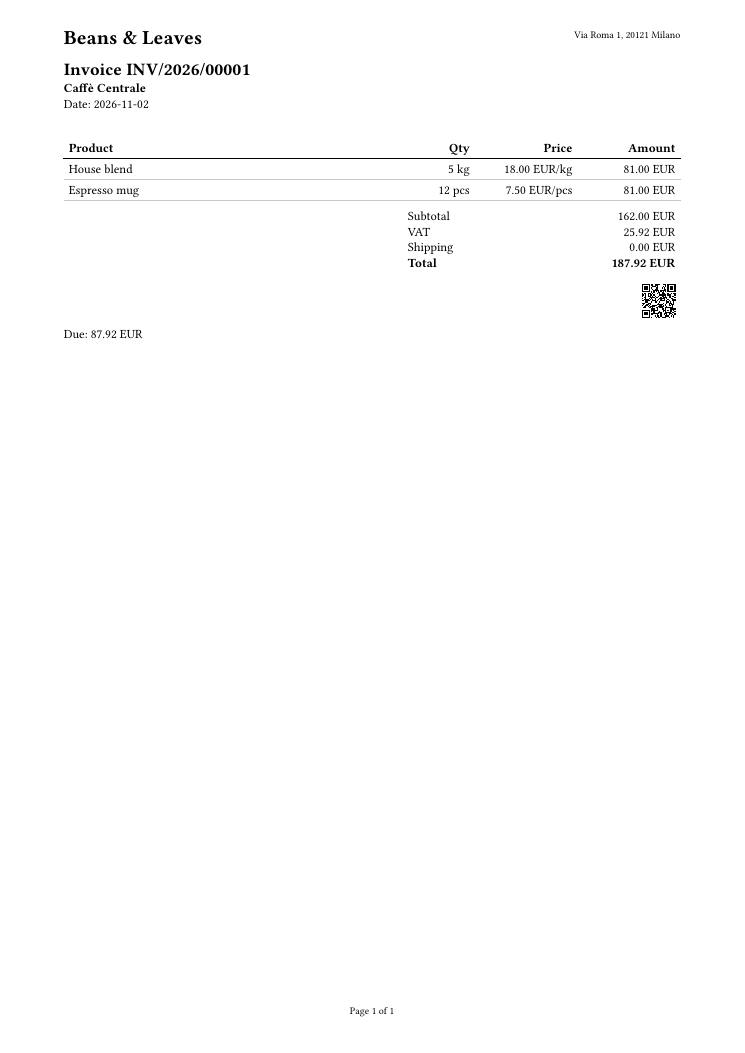
Keep it with the invoice: attach
A posted invoice must not change, and neither may what the customer received. Give it a field for its document:
typerule
entity Invoice:
    # …
    state: enum(Draft, Posted, Cancelled) default Draft
    pdf: File?                              # the invoice as sent, once posted
and in documents/invoice.trp:
typerule
# Once posted, the invoice is rendered and kept: the same bytes for as long as it exists.
attach InvoicePdf to Invoice.pdf signed "company" when state is Posted
After each commit, every invoice that is posted and has no pdf yet is rendered, from the data as it is then, and signed. The bytes are kept once in the store of files (the folder .typerule/files, or a bucket: Files), by their hash, and the field gets sha256:<hash>, in a transaction of its own (attach:InvoicePdf Invoice#45). The render runs after the commit, never inside it, so posting an invoice is not slowed down. If the server stops in between, nothing is lost: the next pass finds the same invoices.
The field is filled once. Change the document's code next year, and the invoices already sent keep the PDF they were sent with, with its hash.
Signed by the company
The certificate is a secret: a .p12 file, in base64, and its password. They are in typerule.toml as secret variables of a signer:
toml
[vars]
SIGN_P12 = { secret = true, description = "the company's signing certificate (.p12, base64)", test = "MIIN…" }
SIGN_PASSWORD = { secret = true, test = "typerule-test" }

# The company's signature, for invoices sent and files to the tax authority.
[signers.company]
p12 = { var = "SIGN_P12" }
password = { var = "SIGN_PASSWORD" }
reason = "Invoice"
location = "Milano"
The test values are a certificate made for tests, never the real one. Tests sign with it, and at the test's clock, so a signed invoice is the same bytes in every run:
typerule
test "a posted invoice keeps its PDF":
    use demo
    let inv = cafe.orders.flat_map(o => o.invoices).first() ?? fail "no invoice"
    expect inv.pdf == "sha256:" + sign(render(InvoicePdf(inv)), "company").hash
On your server, the real values go in the environment (SIGN_P12=$(base64 -w0 < company.p12)) or in typerule cloud env set SIGN_P12.
sign is PAdES, the signature of PDFs. For the files of the tax authority there are p7m(…) (CAdES, the .xml.p7m of FatturaPA) and xades(…); for the bank, pgp_sign and pgp_encrypt (Signatures).
By email
An outbound builds the email from the event, after the commit: the place to render and attach the invoice. mailing.tr:
typerule
# Each invoice posted goes to the customer by email, the PDF attached and signed.

from invoices import Invoice
from documents.invoice import InvoicePdf


event InvoiceEmail(invoice: Invoice, to: Email, number: Text)

on Invoice enters Posted as i:
    if let to = i.customer.email:
        emit InvoiceEmail(invoice=i, to=to, number=i.number ?? "")


outbound InvoiceEmail via mail as e:
    let pdf = sign(render(InvoicePdf(e.invoice)), "company")
    email(to=e.to, subject="Invoice " + e.number,
        body="Hello " + e.invoice.customer.name + ",\n\nyour invoice is attached.\n\nBeans & Leaves",
        attachments=[pdf])
render is not allowed in an action or a reaction:
text
`render` renders a document, which takes time: it runs after the commit, in an `outbound … as e:` block, or with `attach InvoicePdf to …`A label for every parcel
A label has a size in millimetres and the resolution of its printer, and its elements are placed, x and y from the top left:
typerule
# documents/label.trp: the label on each parcel, for the thermal printer in the back office.

from orders import Order


label ParcelLabel(o: Order) width 100 height 150 dpi 203:
    let number = o.number ?? ""
    text "Beans & Leaves" x 5 y 5 size 10 bold
    text "Via Roma 1, 20121 Milano" x 5 y 10 size 8
    line x 5 y 16 x2 95 y2 16 thickness 0.4
    text o.customer.name x 5 y 22 size 16 bold width 90
    if let a = o.ship_to:
        text a.street x 5 y 32 size 12 width 90
        text a.zip + " " + a.city x 5 y 39 size 12 width 90
    text "Order " + number x 5 y 55 size 12
    barcode "37610425002123456" type sscc x 10 y 70 height 30 human
    barcode "https://beans.example.com/track/" + number type qr x 65 y 110 height 30
    box x 2 y 2 width 96 height 146 thickness 0.5
The same label gives a PDF (render) for a laser printer, and ZPL (zpl) for Zebra and compatible thermal printers, in dots at the label's dpi:
typerule
test "a parcel label, as PDF and as ZPL":
    use shop
    let o = Order(customer=anna, lines=[OrderLine(product=mug, qty=2 pcs)])
    o.confirm()
    let pdf = render(ParcelLabel(o))
    expect pdf.text.contains("Anna Rossi")
    let z = zpl(ParcelLabel(o))
    expect z.starts_with("^XA")
    expect z.contains("^PW799")                         # 100 mm at 203 dpi
    expect z.contains(">;>800376104250021234569")      # the SSCC, with its check digit
sscc takes the 17 digits of the parcel's serial shipping container code and adds the check digit (9). It prints it as GS1-128 with the application identifier (00), as carriers read it.
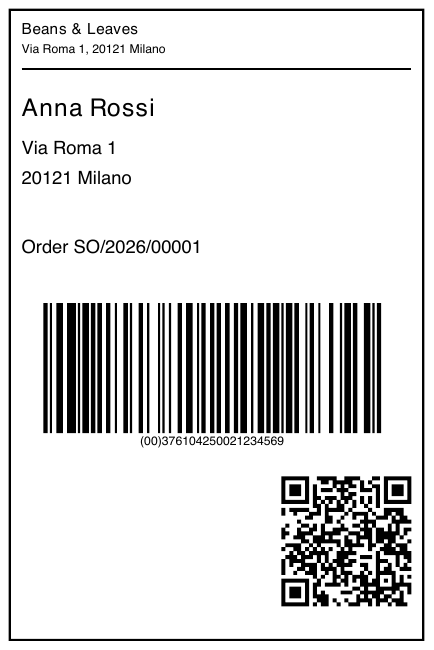
Printed in the back office
The Zebra is in the shop's network: a printer connection, reached by the agent of step 14.
toml
# The thermal printer in the back office: raw printing on port 9100, reached by the agent there.
[connections.zebra]
kind = "printer"
url = "tcp://192.168.1.50:9100"
location = "agent:backoffice"
typerule
# printing.tr: a shipped order's label goes to the thermal printer in the back office.

from orders import Order
from documents.label import ParcelLabel


event LabelToPrint(order: Order)

on Order enters Shipped as o:
    emit LabelToPrint(order=o)


outbound LabelToPrint via zebra as e:
    print(zpl(ParcelLabel(e.order)))
print ends the block, as write does for files. A printer that is off is tried again, like any connection that does not answer. A printer of the office's system takes PDFs: url = "lp://Brother_HL" and print(render(InvoicePdf(…))).
Run it
bash
typerule testtext
…
61 passed, 0 failed
Start the server with the demo data, and the two posted invoices get their PDF within a second:
bash
typerule db init && typerule db fixture demo
typerule serve --dev-login
text
4|attach:InvoicePdf Invoice#52  (system, 2026-11-27 19:15)
3|attach:InvoicePdf Invoice#45  (system, 2026-11-27 19:15)
Download it as anyone who may read the invoice:
bash
curl -H "Authorization: Bearer $TOKEN" -o invoice.pdf \
  http://127.0.0.1:8080/v1/records/Invoice/45/files/pdf
pdfsig invoice.pdf
text
  - Signer Certificate Common Name: ACME S.p.A.
  - Total document signed
  - Signature Validation: Signature is Valid.
  - Certificate Validation: Certificate issuer isn't Trusted.
(The test certificate is issued by a test authority, which no one trusts: the signature itself is valid.) As sam, the clerk, who may not read invoices:
json
{"error":"permission denied: cannot read Invoice.pdf"}Try it
- Add a delivery note:
document DeliveryNote(o: Order), with the lines and their quantities but no prices, attached toOrder.notewhen the order is shipped. - Put the logo on the invoice:
image "assets/logo.png" width 40in the header's row. - Print the invoice on the office's laser printer when it is posted: a connection
kind = "printer"withurl = "lp://…"(Printers).
Recap
- Documents and labels are written in
.trpfiles, checked with the model, and rendered by the server:render(…)gives a PDF,zpl(…)a label for thermal printers. - The same data gives the same bytes: a document is identified by its hash.
attach … to Entity.field when …renders after the commit and keeps the document with the record, once, signed if you say so.- Certificates and keys are signers of
typerule.toml, from secret variables:sign,p7m,xades,pgp_sign,pgp_encrypt. - In outbound blocks, documents go out attached to emails, written as files, or printed (
kind = "printer",print(…)).